











SAP® Add-on · Email Delivery of Forms
SAP® Email Plugin – Intelligent Form Delivery
The solidforms SAP® Email Plugin enhances email delivery of your SAP® forms with flexible rules for senders, recipients, email messages, and attachments. Send order confirmations, invoices, purchase orders, and other documents with individually designed emails directly from your business processes.
Your Benefits at a Glance
- Rule-based determination of senders and multiple recipients
- Individual email messages by form, form type, and company code
- Plain-text or HTML emails with images, signatures, and variables
- Company-code-specific disclaimers and legal notices
- Edit emails manually and add attachments before sending
Your Benefits
More Than a Simple Email with a PDF Attachment
Flexible Recipient Selection
Determine multiple email addresses based on partner roles, responsibilities, purchasing groups, or predefined addresses.
The Right Sender
Define the sender independently of the SAP® user executing the process, based on the form and organizational unit.
Professional Email Messages
Design plain-text and HTML emails with dynamic content, graphics, and signatures tailored to each business process.
Within Your Business Processes
Send Forms with Personalized Email Messages
Whether for sales orders, billing documents, deliveries, purchase orders, or FI correspondence, the add-on extends your existing form output with configurable email control. The SAP® form can be sent as a PDF attachment, while the accompanying email is created independently in plain text or HTML.

Form Features
Configure Senders, Recipients, and Email Content Centrally
Sender Control
Determine the sender address based on form, form type, and company code, using the user, purchasing group, or a predefined value.
Recipient Determination
Rule-based determination of multiple recipients, such as business partners, message partners, partner roles, responsible employees, or predefined addresses.
Plain Text and HTML
Use form-specific messages as plain-text emails or designed HTML emails with graphics and signatures.
Disclaimers
Add mandatory legal information and other notices through company-code-specific email disclaimers.
Text Variables
Replace predefined placeholders in email messages with information from the relevant SAP® business process.
Manual Editing
In interactive mode, review or modify the sender, recipients, subject, and message, and attach additional files.
The Product
SAP® Email Plugin – Feature Overview
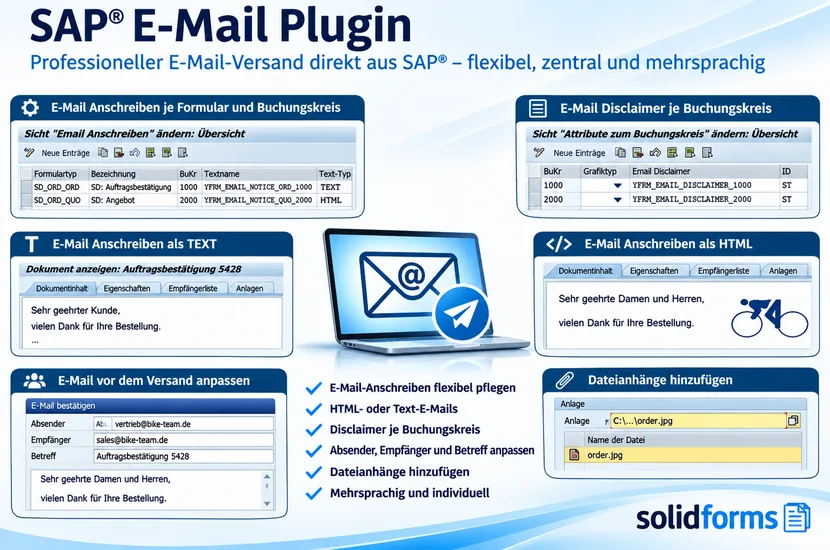
The illustration shows how email messages and disclaimers are maintained, how plain-text and HTML emails are used, and what can be edited before sending. Click the image to enlarge the feature overview.
Supported Processes
Email Output in SAP® SD, MM, LE, and FI
Sales · SAP® SD
Including quotations, order confirmations, invoices, credit memos, and invoice lists.
Purchasing · SAP® MM
Including purchase orders, purchase order changes, purchasing contracts, and scheduling agreement releases.
Shipping · SAP® LE
For example, delivery notes and other logistics documents generated through output determination.
Financial Accounting · SAP® FI
Including dunning notices and payment advices.
Integration with additional form processes can be evaluated based on your print programs and output technology.
Customizing
Individual Emails Without Separate Templates for Every Company Code
Email settings can be maintained centrally by form, form type, and company code. This allows different companies to use the same form while having different email senders, signatures, messages, and disclaimers.
For more information about centralized form architectures, see solidFormKit and SAP® Form Development with Adobe Forms.
Implementation Process
From Add-on to Productive Email Delivery
01 · Analysis
Review the SAP® release, forms in use, print programs, delivery rules, and email infrastructure.
02 · Integration
Set up ABAP components and customizing tables and integrate the relevant output processes.
03 · Testing
Test senders, recipients, HTML rendering, attachments, and delivery in the agreed business processes.
Technical Implementation
Rule-Based Email Delivery Directly from SAP®
The plugin extends the email capabilities of your existing form output. Depending on the print program and process, messages can be generated automatically or manually edited in a dialog before sending.
Technical Information
System Requirements and Scope of Delivery
| Topic | Description |
|---|---|
| Product | SAP® Email Plugin – Add-on for Form Output |
| Modules | SAP® SD, MM, LE, and FI; other processes subject to evaluation |
| Technology | ABAP classes, function modules, and customizing tables |
| Forms | Integration with solidforms forms and adapted Adobe Forms print programs; SAPscript and Smart Forms may be supported with additional development |
| Email Content | Plain text or HTML, placeholders, images, and signatures |
| Control | Sender, multiple recipients, email messages, and disclaimers controlled through customizing |
| Interactive Sending | Editing of sender, recipients, subject, message, and additional attachments |
| Previous Product Requirements | According to the previous product page: SAP® ECC 6.0 or later, Adobe Document Services (ADS), and use of solidforms forms |
| SAP® S/4HANA | Compatibility and the specific output process must be checked before commissioning |
| Previous Scope of Delivery | License for one SAP® system, ABAP components, customizing tables, and documentation; current scope as specified in the quotation |
Note: The features listed are based on the previous product description. Support for your specific system version, output management, and email infrastructure will be agreed before implementation.
Frequently Asked Questions
Frequently Asked Questions About the SAP® Email Plugin
Can I specify multiple recipients?
Yes. The add-on supports rule-based determination of multiple recipients from partner roles, responsibilities, and predefined email addresses.
Can the email message be designed in HTML?
Yes. In addition to plain-text emails, HTML messages with images and signatures are supported.
Can I edit the email before sending?
Yes. In interactive output mode, you can edit recipients, sender, message, and attachments, among other details.
Does the add-on also work with existing forms?
Existing Adobe Forms print programs can be integrated with appropriate enhancements. Effort and compatibility are evaluated individually.
SAP® Add-ons · solidforms
Want to Send Your SAP® Forms by Email Professionally?
Whether you need automatic recipient determination, HTML email messages, multiple company codes, or additional attachments, we assess your requirements and prepare a tailored quotation.
Reviews
There are no reviews yet.