











SAP® MM · Adobe Form
SAP® Purchase Order Form
A professional SAP® purchase order form for your procurement department: clearly structured, multilingual and adaptable to your purchasing processes. Based on Adobe Forms, the solution supports standard purchase orders as well as other purchasing document types.
The Form at a Glance
- Purchase order header, supplier and delivery address, line items and delivery dates
- Multiple purchasing document types with a consistent layout
- Language-dependent labels and configurable texts, logos and sender information
Your Benefits
A Purchase Order Form Tailored to Your Procurement Processes
Consistent Presentation
A clean A4 layout ensures professionally presented purchase orders and other purchasing documents.
Flexible Configuration
Selected elements such as the logo, date, contact person and material description can be configured without changing the form layout.
Multilingual Support
Form output in German and English with language-dependent text labels; additional languages can be implemented upon request.
In the Business Process
From SAP® Purchasing Document to Purchase Order Form
The purchase order is created in SAP® Materials Management (MM). Relevant header and item data are passed to Adobe Forms through the print program and form interface, producing a PDF-based document. Learn more on our page about SAP® Form Development with Adobe Forms.

Supported Purchasing Documents
More Than Standard Purchase Orders
According to its existing specification, the form solution supports different purchasing document types. Their use and output are configured to match your document types during implementation.
Purchase Orders and Changes
Purchase orders, stock transport orders, returns purchase orders and purchase order changes.
Requests for Quotation and Outline Agreements
Requests for quotation, contracts, scheduling agreements and scheduling agreement schedule lines.
Purchasing Reminders
Purchase order reminders and order acknowledgment reminders.
One Form – Multiple Processes
A shared layout with document-specific content and text avoids maintaining unnecessary separate form variants.
The Product
What Your SAP® Purchase Order Can Look Like
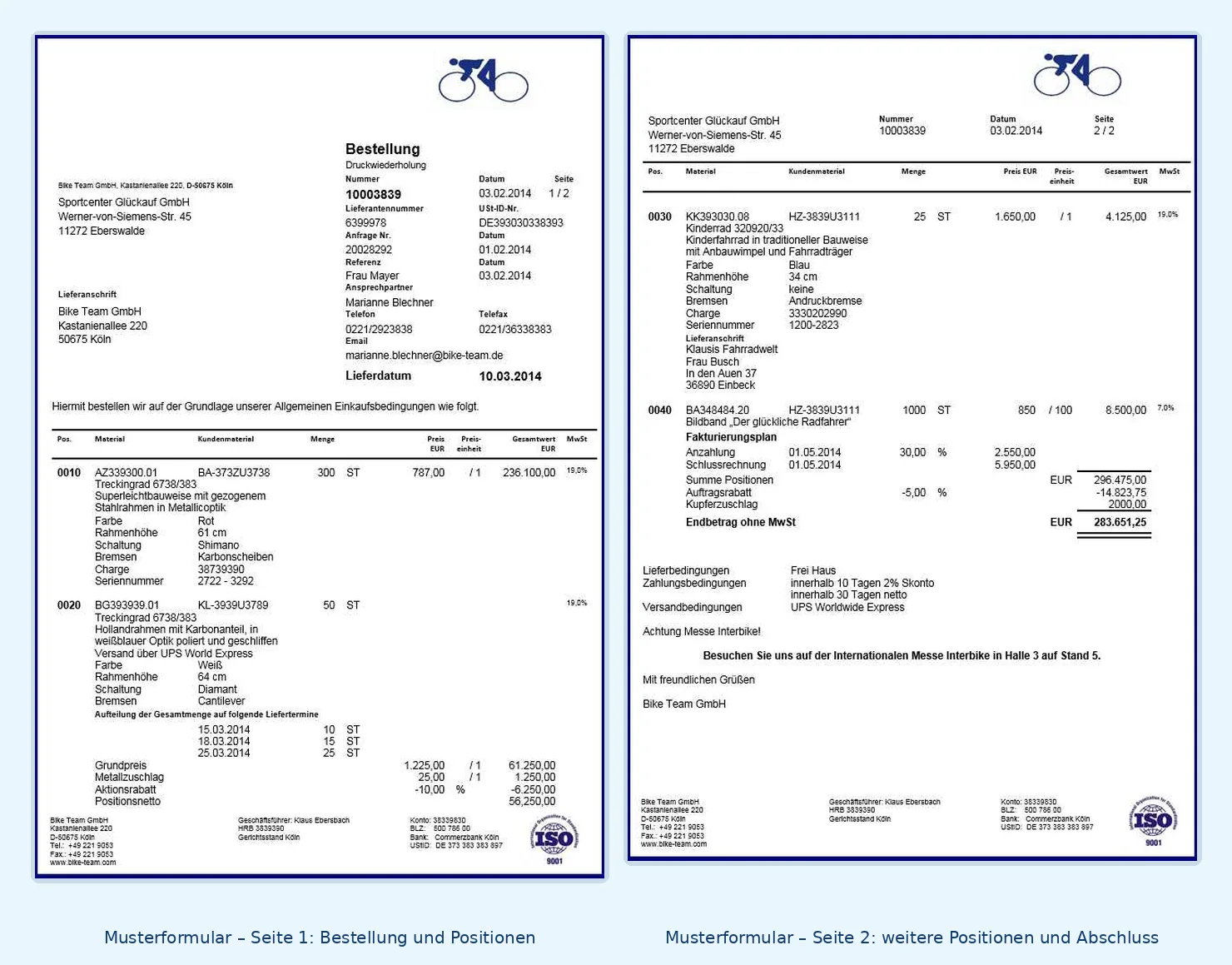
The sample shows a two-page purchase order with header details, supplier, delivery address, items, quantities, delivery dates and notes. Click the image to view both pages at a larger size.
Typical Form Contents
Purchase order number, date, supplier, contact person, delivery address, materials, quantities, delivery dates and payment terms.
Custom Design
Company logos, additional fields, texts, stationery and country-specific requirements can be incorporated by agreement.
Form Configuration
Less Programming Through Configuration
Field Configuration
Logo selection by output medium; configurable date and contact details; alternative material numbers or EANs where available in the system.
Text and Layout Configuration
Language-dependent labels, texts, sender details, footer and logo depending on company code and document type.
The associated tools of solidFormkit support the maintenance of form labels, translations and text configuration. For multiple countries or companies, we recommend a coordinated SAP® Rollout and Form Strategy.
Implementation Process
From Form Product to Productive Use
Review Requirements
We clarify the SAP® release, document types, languages and output channels.
Installation and Setup
Transport, configuration, output determination and document output are set up as agreed.
Testing and Approval
Relevant document scenarios are tested before go-live.
Form Output
Output from SAP® Purchasing
Depending on the configuration, output is provided by print, email or other available channels. The specific output determination depends on your SAP® system.
Technical Information
System Requirements and Scope of Delivery
| Topic | Description |
|---|---|
| SAP® Module | Materials Management / Purchasing (MM) |
| Form Technology | SAP® Interactive Forms by Adobe (PDF-based print form) |
| System Requirements | The existing product specification lists SAP® ECC 6.0 or later and Adobe Document Services (ADS). We assess suitability for your specific SAP® S/4HANA release and output architecture in advance. |
| Supported Documents | Purchase orders, changes, requests for quotation, contracts, scheduling agreements and selected reminder documents according to the agreed configuration |
| Languages | German and English according to the existing product specification |
| Scope of Delivery | Adobe Form, print program and interface, configuration program, text maintenance tools and documentation according to the agreed scope |
| Output | Print, email and potentially other channels depending on the system and configuration |
| Installation | By solidforms as agreed; scope and fees are specified in the quotation |
| Customizations | Available on request for an additional fee |
| Licensing / Maintenance | Terms and any required SAP® licenses must be clarified before commissioning |
The previous product description refers to an existing Adobe Forms solution for SAP® Purchasing. Before making a binding commitment, we determine whether and with which modifications it can be used in your S/4HANA landscape. This applies in particular to output determination and the print programs used.
Frequently Asked Questions
What Customers Want to Know Before Enquiring
Can I Use My Company Logo?
Yes. The form layout can be adapted to your corporate design.
Can I Use Multiple Document Types?
Yes. The existing solution supports different purchasing document types. We assess which ones you need.
Can I Maintain Texts Myself?
Selected texts, labels and configuration parameters can be maintained using customizing or the supplied tools.
Can I Get Advice Before Ordering?
Yes. Tell us about your requirements via our contact page.
SAP® Form Development · solidforms
Would You Like to Adapt the Purchase Order Form to Your Purchasing Process?
Whether you need different document types, corporate layouts, international company structures or special output rules, we review your requirements and prepare a tailored quotation.
Reviews
There are no reviews yet.