





Customer-Specific Label Management in SAP®
From manually designed packaging labels to automated, rule-based label printing directly from SAP®.
How a shelving-system manufacturer brought different retail brands, customer logos and product information together in a maintainable label management solution.

The Starting Point: One Product, Many Retail Brands
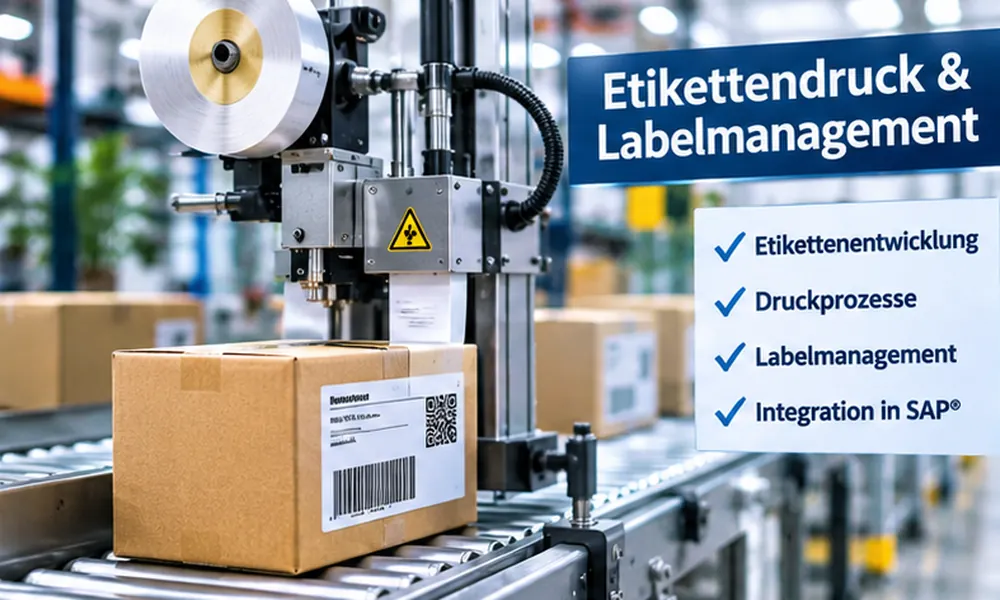
A furniture manufacturer produces shelving systems sold both under its own brand and under the private labels of various retailers. Cartons are labeled at the packaging machine. Layouts and information vary considerably from customer to customer.
Customer-Specific Design
Retail brand, customer logo and different label layouts.
Individual Product Data
EAN, customer material number and the retailer’s final selling price.
Manual Process
An employee designed labels in a graphical layout editor and stored the print files at the printing unit.
Before and After – A Clear Difference
Before: Manual Label Creation
- Production order assigned to a customer
- Design the label in a graphical layout editor
- Manually incorporate customer data and graphics
- Store the print file on the printing unit’s computer
- Time-consuming process with a risk of incorrect information
Today: Rule-Based SAP® Label Management
- Determine the label layout using master data and classification
- Automatically retrieve order data from SAP®
- Generate an Adobe Forms label
- Transfer the print file to the printing unit server when the production order is released
- Add new layouts only when needed
How Automated Label Printing Works
Release Order
The production order is released for manufacturing.
Determine Variant
Material classification and label master data determine the appropriate layout.
Generate Label
ABAP provides the data; the assigned Adobe Form generates the print output.
Transfer Print File
The completed file is sent to the printing unit server at the packaging machine.
Schematic representation of the workflow described in the customer reference.
The Five Technical Building Blocks
First, the differences between label variants were analyzed. A system of reusable components was then developed to work together according to defined rules.
Label Master Data with Adobe Forms Assignment
Each defined label layout receives a name. The corresponding Adobe Form is assigned to that name in the label master data.
Material Variants and Classification
A material variant was created for each label. Its classification includes the label name and the graphic for the customer logo, among other attributes.
Centralized ABAP Data Retrieval
A function module retrieves all potentially required data for the production order and makes it available in a flat, documented structure. This allows the forms developer to work independently of the ABAP implementation.
Dialog Program for Reprinting
A separate program allows labels to be printed manually using a production order, sales order or material number, with a freely selectable number of labels.
Documentation of Label Variables
All variables and rules are documented. This enables a quality management employee to design new label layouts using the documentation.
A Look at the Technical Implementation
The following five original SAP screenshots show how label master data, material classification, ABAP data retrieval, the printing dialog and variable documentation interact in the implemented solution.
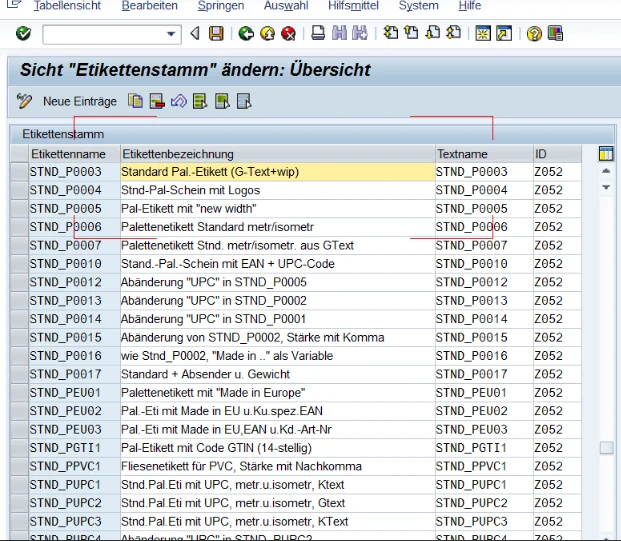
Label Master Data in SAP
Maintenance of label definitions with label name, description, text name and ID. The table includes standard and customer-specific pallet labels.
Click the screenshot to enlarge it.
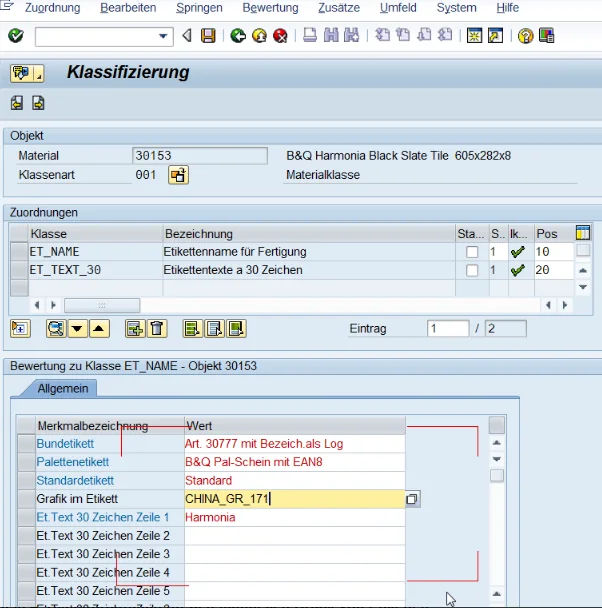
Material Classification in SAP
Material 30153, class type 001: Class ET_NAME includes attributes such as pallet label, standard label, label graphic and label texts.
Click the screenshot to enlarge it.
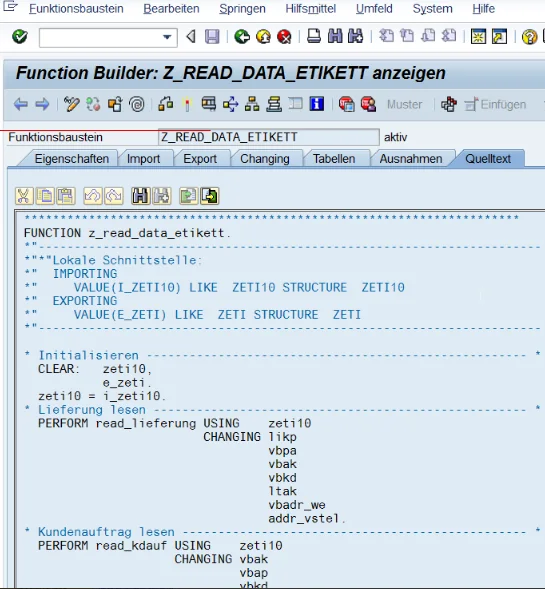
ABAP Function Module Z_READ_DATA_ETIKETT
The Z_READ_DATA_ETIKETT function module accepts a label structure and retrieves delivery and sales order data, among other information. The visible source code shows excerpts from its internal processing.
Click the screenshot to enlarge it.
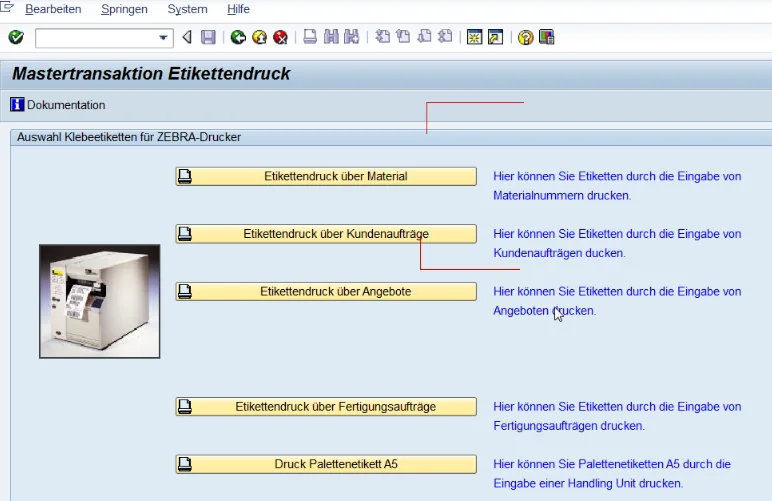
Label Printing Master Transaction
The printing transaction offers several entry points: material, sales order, quotation, production order and pallet label via handling unit.
Click the screenshot to enlarge it.
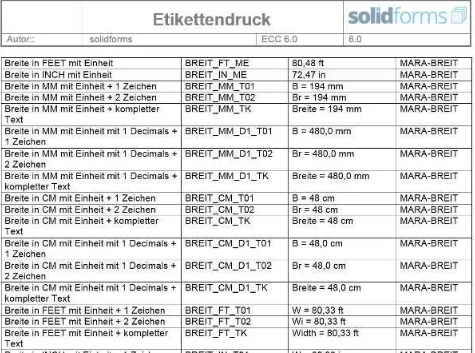
Documentation of Label Variables
The documentation lists field descriptions, variable names, sample values and SAP data sources, such as material widths in different units and formats.
Click the screenshot to enlarge it.
The screenshots show a customer-specific SAP ERP solution. Field names, programs and screens may differ in other systems.
Project Results
Significantly Less Manual Work
Instead of spending an entire day creating labels, design work is now required only when a new label layout is introduced.
Higher Data Quality
Label data comes from defined SAP® structures instead of repeated manual entry.
Fewer Relabeling Operations
According to the project reference, time-consuming corrections caused by incorrect label data were greatly reduced.
Qualitative project results from the published customer reference; no unsubstantiated savings percentages.
Key Takeaways for Other Companies
Understand Variants First
A robust set of rules starts with a systematic analysis of all label differences.
Separate Data from Layout
A centralized, documented data structure makes it easier to design new labels.
Plan for Reprinting
Even automated processes need a controlled way to handle manual reprints.
Technical Questions About the Solution
How Is the Correct Label Layout Determined?
The label name is determined from the material variant and its classification. The corresponding Adobe Form is assigned in the label master data.
Who Can Design New Labels?
In this project, a quality management employee creates new layouts. The available fields are documented, so not every layout adjustment requires ABAP development.
Is Manual Reprinting Possible?
Yes. A dialog program supports reprinting by production order, sales order or material number, with a selectable quantity.
Can the Solution Be Used for Other Labeling Processes?
The principle of centralized data retrieval, layout assignment and rule-based control can be applied to other scenarios. The specific technical integration of the printing unit must be assessed in each case.
Too Many Label Variants and Too Much Manual Work?
We analyze your label landscape and develop a transparent solution for automatic layout selection, data retrieval and print control from SAP®.
Discuss Your Label Management Project →